Local SEO Checklist: Rank Higher in Local Searches
Local SEO is a fundamental growth strategy for businesses that want to grow by reaching customers in their local area. Optimizing your Google Business Profile (GBP) is vital to be found by nearby customers who are ready to buy.
If your business doesn’t appear in the top 3 Google Map results (Local Pack), you’re missing out on significant high-intent traffic.
This guide offers a step-by-step Local SEO checklist, curated from experience and tested best practices, designed to help your business rank higher in Google’s local search results and convert visibility into measurable revenue.
What Is Local SEO?
Local SEO (Local Search Engine Optimisation) optimizes your business’s digital assets, primarily your Google Business Profile, to improve visibility for location-based queries.
With current trends, Google continues to refine how it connects users with nearby solutions, giving more weight than ever to relevance, proximity, and business credibility.
Unlike traditional SEO, which focuses on organic rankings across the broader web, local SEO targets geographically restricted searches, often including a Google Map Pack followed by localized organic results.

Factors To Consider in Local SEO
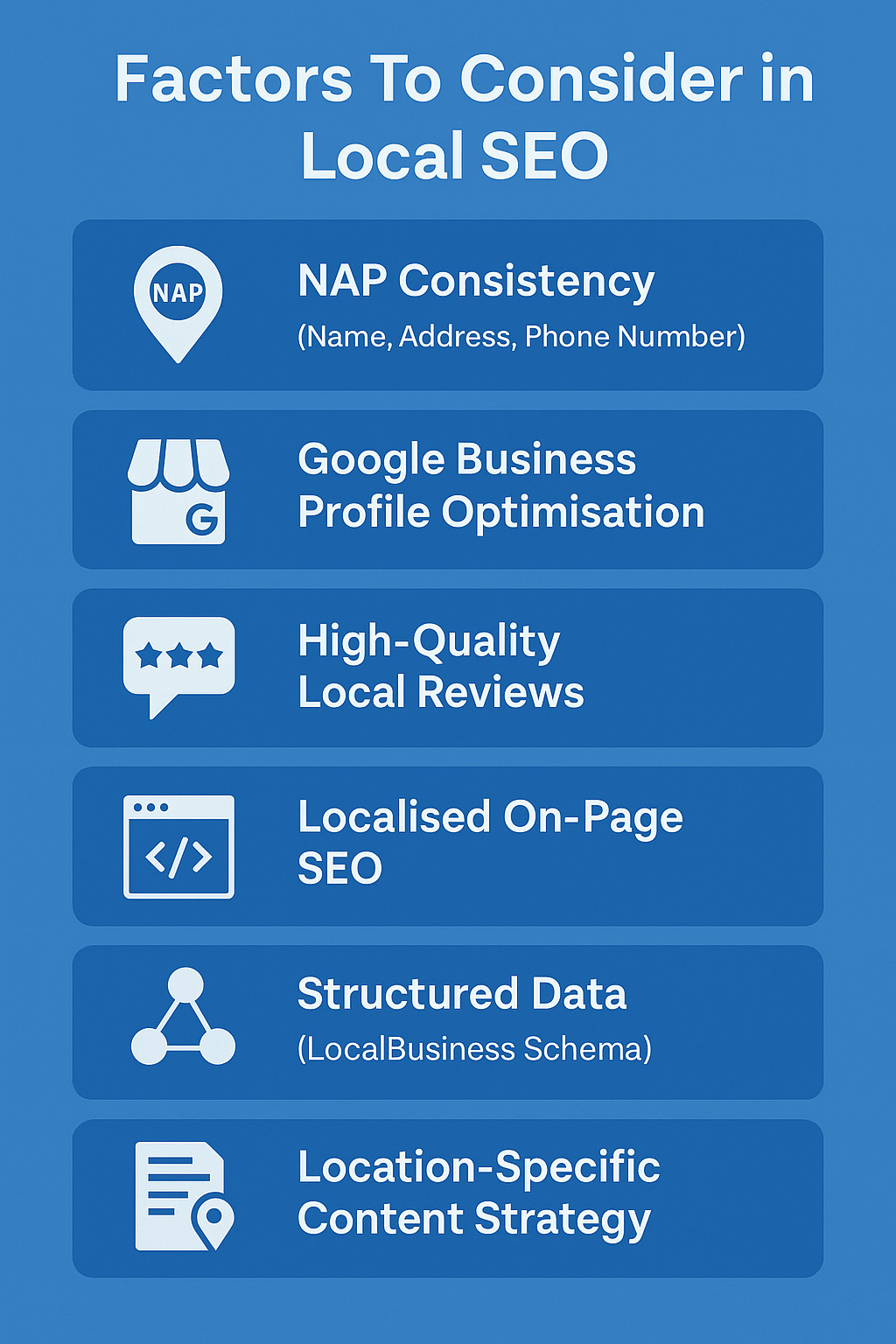
To rank high in local search results and appear in Google’s Local Pack, businesses must focus on more than just keywords.
Below are the most essential factors to consider in Local SEO for consistent visibility and performance:
- NAP Consistency (Name, Address, Phone Number): Your business’s NAP details must be 100% consistent across all platforms, including website, GBP, directories, and social profiles. Inconsistencies confuse search engines and lower trust, leading to ranking drops in both the local pack and organic results.
- Google Business Profile Optimisation: A fully optimized GBP listing increases visibility, click-through rate, and trust. Ensure your business categories, description, hours, photos, and services are complete and updated regularly. Use Google Posts, Q&A, and attributes to engage users and influence conversions.
- High-Quality Local Reviews: Positive, recent, and detailed reviews help build social proof and trust. Ask happy customers to share their reviews, and ensure to respond to positive and negative feedback in a respectful and professional manner. Google considers review velocity and diversity as ranking signals.
- Localized On-Page SEO: Include your city, service area, and neighborhood names in key on-page elements like title tags, H1s, meta descriptions, and content. Create separate services and city-specific landing pages to target multiple locations without keyword cannibalisation.
- Structured Data (LocalBusiness Schema): Implementing structured data helps Google understand your business details like address, hours, reviews, and services. This boosts your visibility in rich snippets and strengthens your business’s credibility in local search results.
- Location-Specific Content Strategy: Creating blog posts, landing pages, and guides tailored to local events, issues, or neighborhoods helps you build authority in your community. This also attracts geo-targeted traffic and engagement.
Traditional SEO vs. Local SEO: Key Differences
| Aspect | Traditional SEO | Local SEO |
| Primary Objective | Rank globally or nationally for keywords | Rank in local search results for geo-specific queries |
| Target Audience | Broad audience across regions or countries | Nearby users searching with local intent |
| Search Intent | Informational, transactional, or navigational | Location-based, service-driven, high-conversion intent |
| Key Ranking Factors | Backlinks, content quality, domain authority, and user experience | Proximity, relevance, prominence, NAP consistency, Google reviews |
| Main Platform | Website and on-page content | Google Business Profile (GBP) and citations |
| SERP Appearance | Organic listings only | Appears in Local Pack (Map) and organic results |
| Conversion Focus | Clicks, traffic, leads | Phone calls, direction requests, foot traffic, and in-store visits |
| Optimisation Tools | Google Search Console, Semrush, Ahrefs | GBP dashboard, BrightLocal, Whitespark, GMB Everywhere |
| Typical Users | E-commerce sites, blogs, SaaS, and digital brands | Local businesses: clinics, law firms, restaurants, home services, etc. |
| Content Strategy | Blog posts, landing pages, product pages | Location pages, service-area content, GBP posts |
Three Local Ranking Pillars: Proximity, Relevance, Prominence
Google uses three core local search ranking factors to determine which businesses appear in local results:
Proximity: How close the user is to your business when they search. Even if your business is highly rated, it may not show if you’re far from the user’s location. This is where Proximity SEO-optimizing for specific service areas and neighborhoods-becomes essential.
Relevance: How well your GBP matches what the user is looking for. Choosing the correct primary category, adding relevant services, and writing keyword-rich business descriptions help improve this factor.
Prominence: How well-known or credible your business is based on signals like:
- GBP reviews and ratings
- Local citations and online mentions
- Inbound local backlinks
- Authority of your website and pages linked to your GBP
Local Keyword Research & On-Page SEO
Successful local SEO begins with understanding user intent and applying accurate on-page strategies. To appear in local search results, your content should include geo-specific keywords that match how people actually search for local services.
How To Find “Near Me” and Geo-Modified Keywords
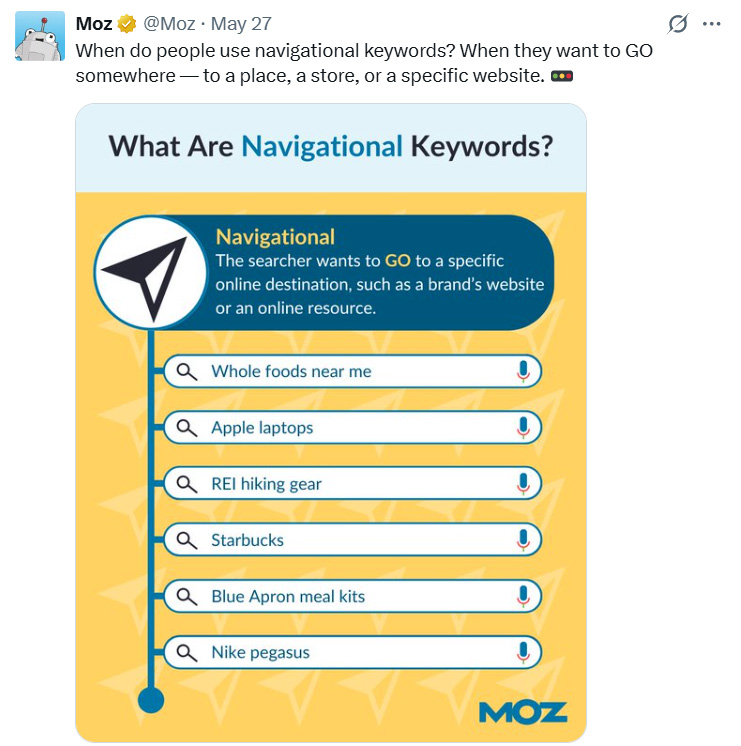
Most local searches today contain location modifiers or implicit local intent. Optimizing for these terms improves your visibility in Google’s Local Pack and map results.
Types of Local Keyword Variations:
- Implicit intent: “Plumber near me”, “Dentist open now”
- Explicit modifiers: “Family lawyer in Atlanta”, “Best cafe in New York”
- Service + Area keywords: “Roof repair in Chennai”, “AC servicing in Lucknow”
Best Tools for Local Keyword Research
- Google Keyword Planner: Use location filters to identify search volume for geo-specific terms. Focus on service + city/state combinations.
- Google Autocomplete & Related Searches: Type seed keywords into Google and observe the autocomplete suggestions or scroll down to “related searches.”
Internal Linking To Local Service Areas
Use strategic internal linking to help Google understand the structure and geography of your website.
Tips:
- Link from the homepage or service hub to each city/service page
- Use descriptive anchor text (e.g., “AC repair in Varanasi”)
- Link between nearby service pages if relevant (e.g., “Also serving Noida and Ghaziabad”)
Optimize URL Structure for Local SEO
Clean, readable, keyword-focused URLs improve both SEO and user trust. For local SEO, include city or neighborhood names directly in the URL
Best Practices:
- Use hyphens, not underscores
- Keep URLs short and descriptive
- Include service and location (e.g., /plumbing-services-chennai)
- Avoid dynamic or messy parameters (e.g., ?id=123&loc=city)

Google Business Profile Optimisation (Core of Local SEO)
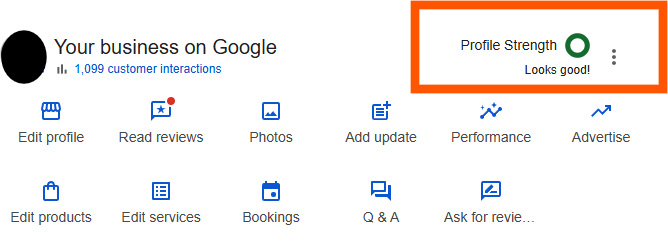
To optimize your Google Business Profile effectively, you must strategically enhance every section of your profile, keeping accuracy, completeness, and consistency at the core of your efforts.
Here’s your GBP SEO checklist to improve rankings, visibility, and local conversions.
1: Claim and Verify Your Listing
Your first step is to claim and verify ownership of your business via Google Business Profile Manager. Without verifying your listing, you won’t be able to manage it, and your business won’t show up in the Local Pack on Google.
Verification methods may include:
- Postcard (most common)
- Phone
- Instant or bulk verification (for chains or trusted businesses)
2: Use an Accurate Business Name (No Keyword Stuffing)
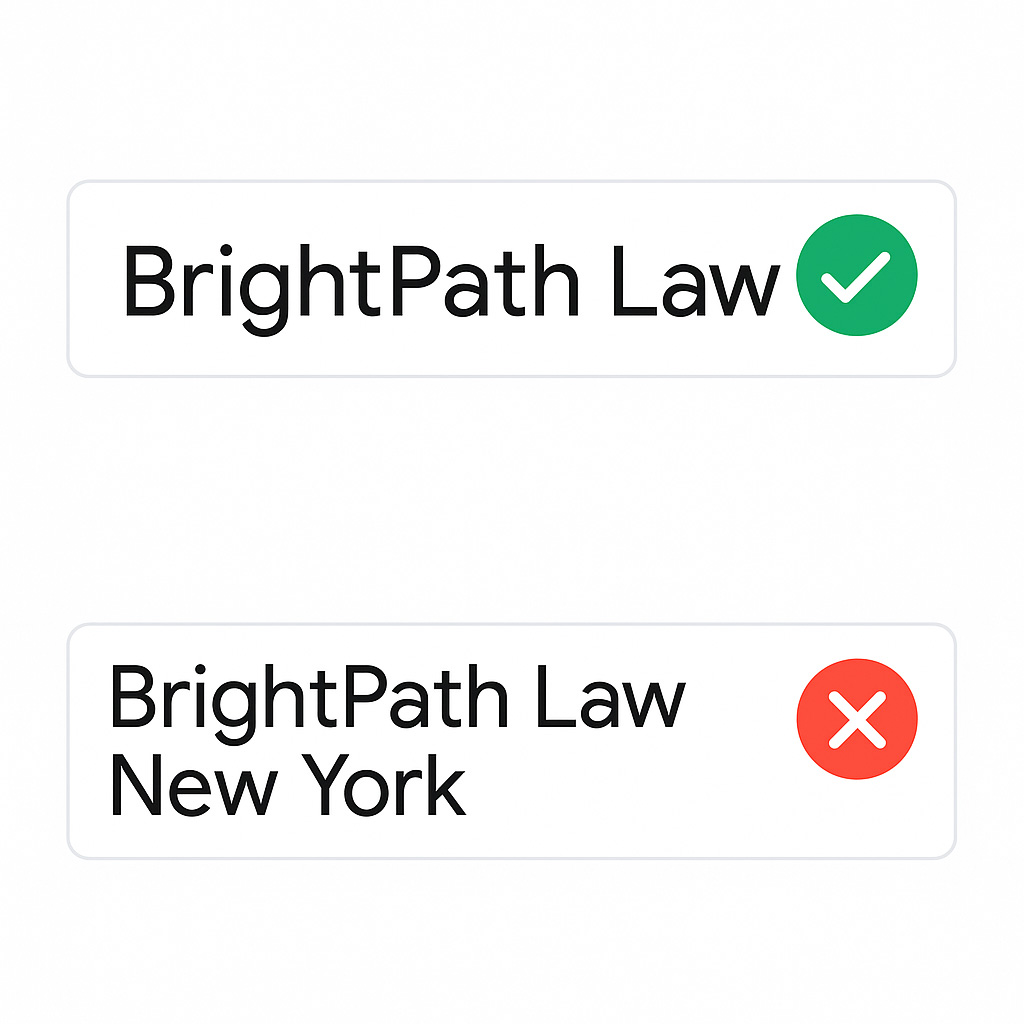
Google’s guidelines strictly prohibit adding extra keywords to your business name. Your name should match what appears on your storefront, signage, and official documents.
For example, the correct business name would be “Galaxy Dental Clinic”, while “Galaxy Dental Clinic – Best Dentist in Lucknow” is considered a violation of Google’s guidelines.
3: Select the Most Relevant Primary & Secondary Categories
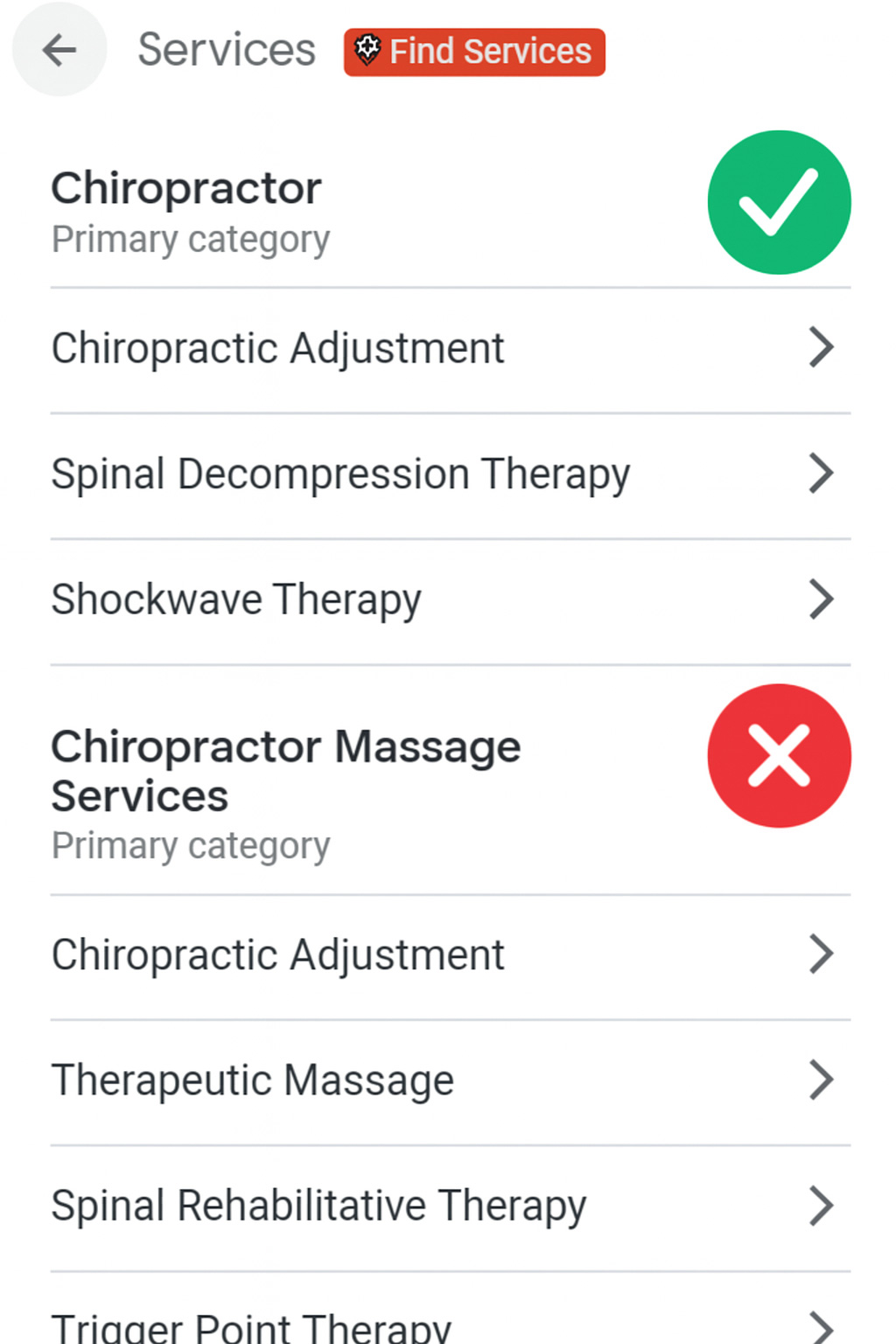
Your primary category is most important in determining when your business appears for relevant queries. Always select the most precise category that accurately represents your core service.
You can add secondary categories to cover additional offerings, but avoid overloading irrelevant ones.
4: Write an Optimized Business Description (with Localized Keywords)
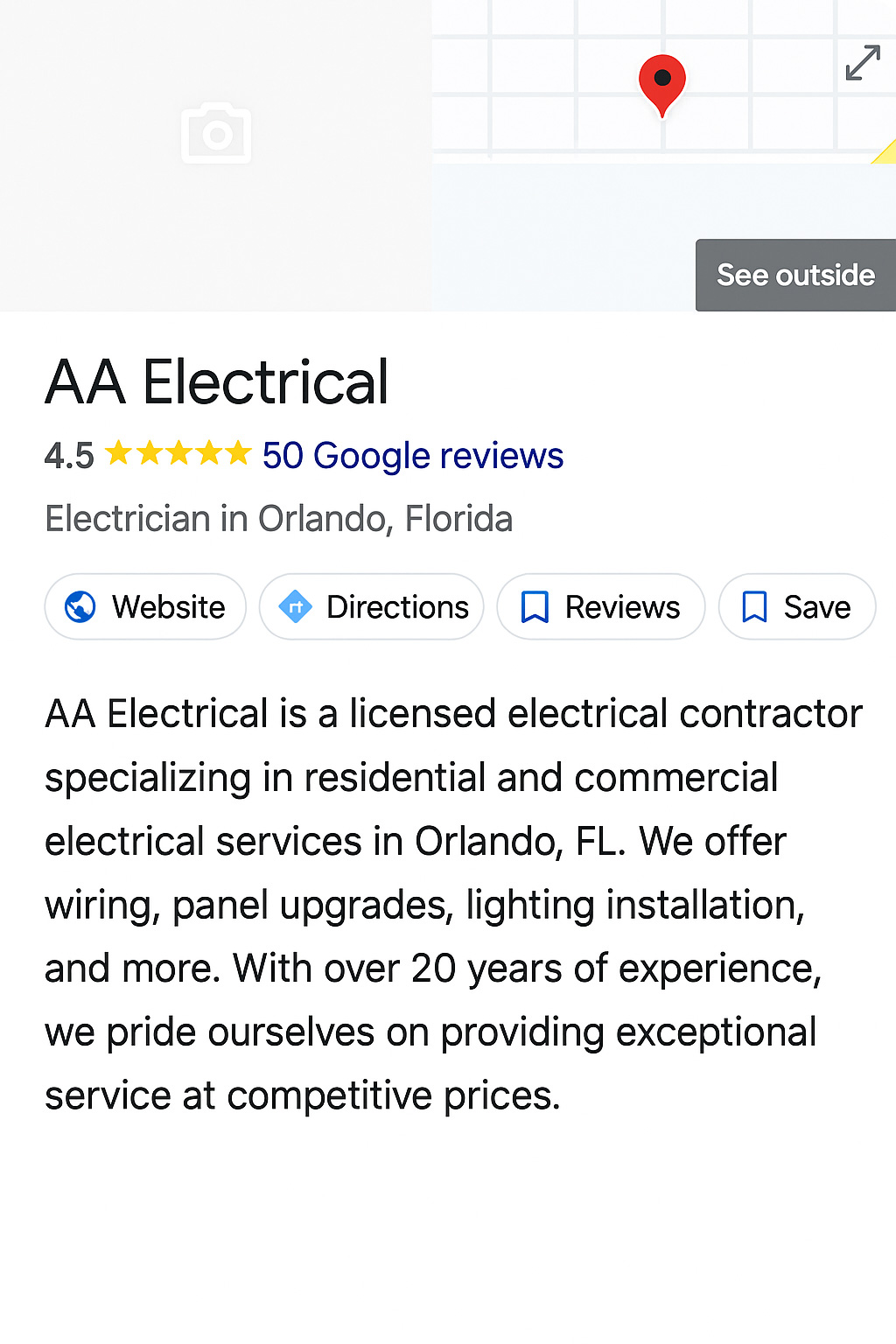
The business description section lets you explain what you do, who you serve, and what makes your business unique. Use this space to incorporate location-based keywords and relevant services naturally.
Do include:
- Service areas
- USP (Unique Selling Proposition)
- Certifications or experience
Don’t include:
- Promotional offers
- Links or contact information (Google forbids this here)
5: Optimize the Products and Services Section
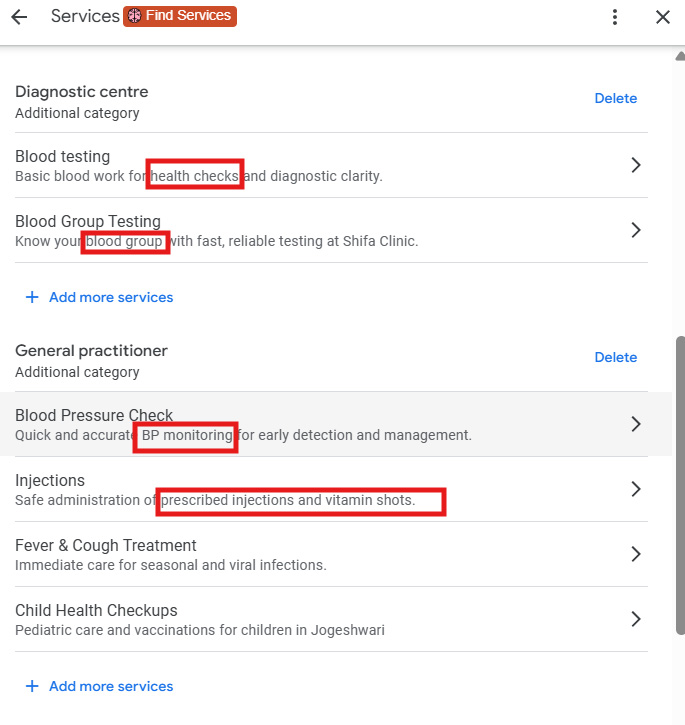
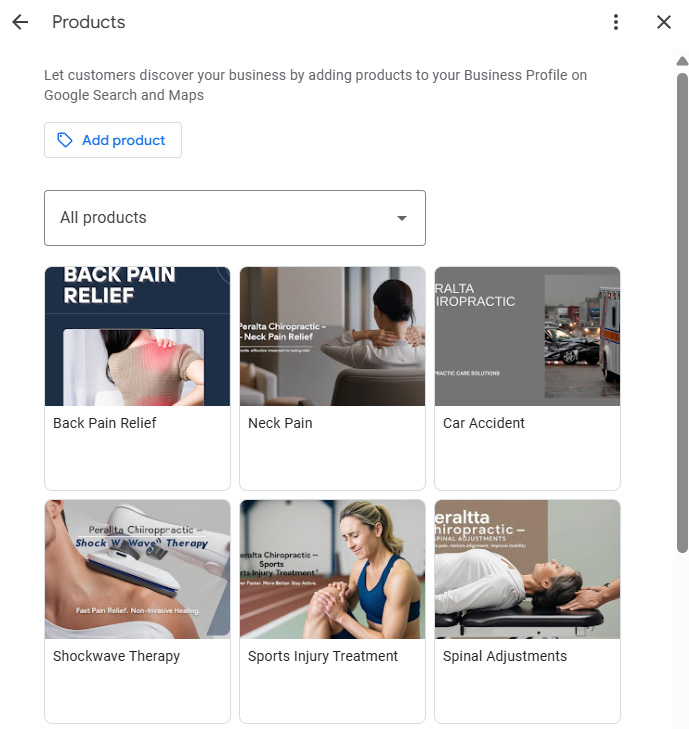
Add detailed services under your GBP, especially if you’re in industries like healthcare, law, salons, or repair services. Each service should include:
- A title
- A short description (use keywords naturally)
- Optional pricing
Use the Products section if you sell physical goods, and add images for each product.
6: Upload Geo-Tagged Photos and Videos
Images help build trust and drive engagement. GBP listings with photos receive:
- 2x more direction requests
- 35% more clicks on the website
Include:
- Exterior and interior shots
- Team photos
- Before/after visuals
- Branded videos (under 30 seconds)
Using geo-tagged images (i.e., photos with embedded location data) may boost local relevance.
7: Post Weekly on Google (Events, Offers, Updates)

Google Posts help you stay active and relevant in the eyes of both users and the algorithm. Post regularly to share:
- Announcements or events
- Special offers
- New products/services
- Seasonal messages
Each post lasts 7 days and supports:
- Photos
- CTAs (e.g., “Call Now”, “Learn More”)
- Link tracking (UTMs)
8: Monitor and Seed the Q&A Section
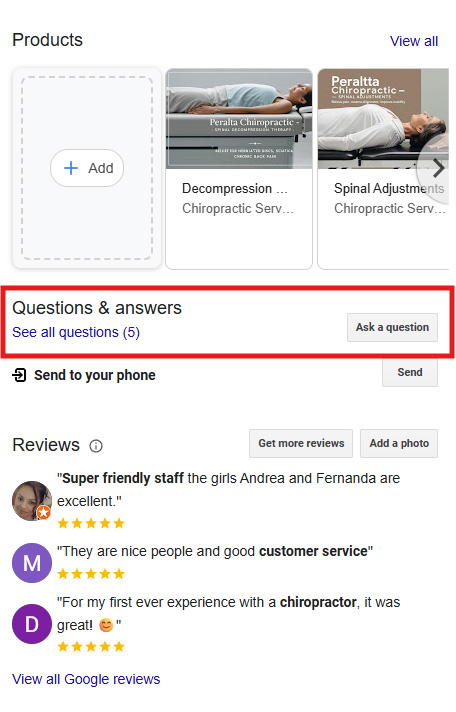
The questions and answers section lets the public ask questions about your business. If you don’t monitor it, others may post incorrect answers.
Best practices:
- Pre-seed common questions using a logged-in Google account
- Upvote your preferred answers
- Monitor and respond quickly to user queries
9: Keep Attributes and Business Hours Accurate
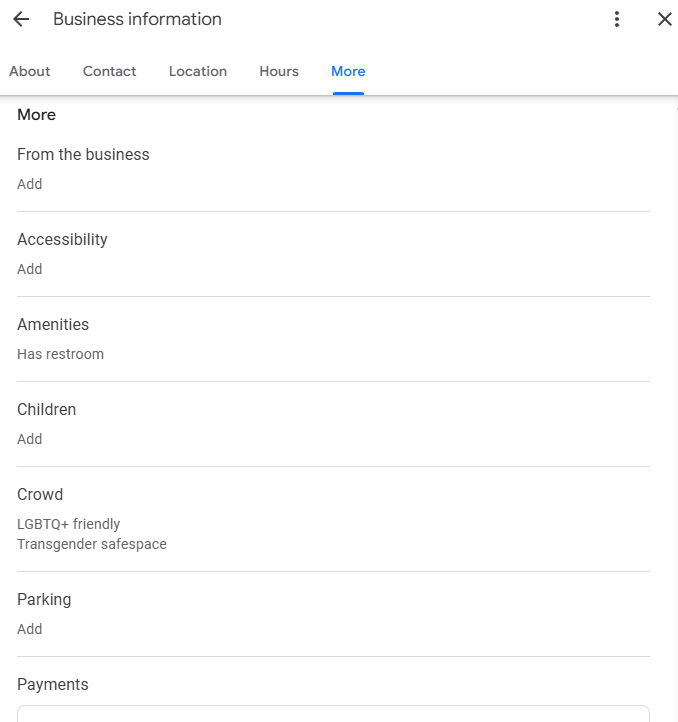
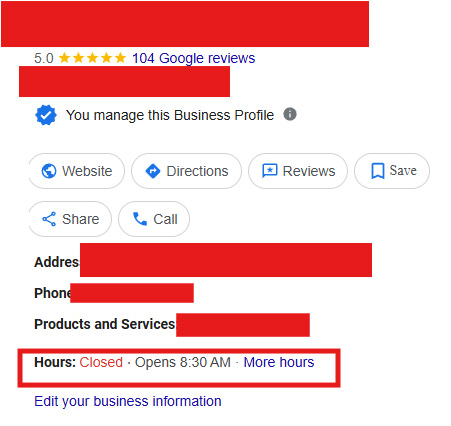
Make sure your attributes and business hours are always accurate. Choose all relevant attributes, like wheelchair accessibility, online appointments, women-owned, or veteran-owned.
Also, regularly update your business hours, especially during holidays, seasonal changes, or service adjustments.
10: Complete Your Profile 100%
Google rewards complete profiles with better visibility. A fully completed GBP:
- Ranks higher
- Builds user trust
- Increases click-through rates
Make sure all sections are filled, including:
- Description
- Categories
- Services/products
- Photos
- Links (website, booking URL)
- Phone number
Website Optimisation for Local SEO
While your Google Business Profile is central to local rankings, your website remains a critical supporting pillar for local SEO success.
To fully support your Local SEO strategy, your website must include strong local signals, dedicated location landing pages, and a technical structure aligned with mobile-first and fast-loading principles.
Here’s how to optimize your website for maximum local search visibility and performance:
1: Homepage Must Reflect Core Local Signals
Your homepage should communicate who you are, where you are, and what you offer. This page is often the highest authority URL on your site and is commonly linked with your Google Business Profile.
Include these local signals above the fold:
- Business name (as it appears on GBP)
- City and state of operation (e.g., “Top-Rated Plumber in Pune”)
- Primary CTA (e.g., “Book a Service,” “Call Now,” “Get Directions”)
- Include a short business description, service areas, and internal links to your most crucial location or service pages.
2: Embed Google Maps on the Contact Page
Embedding an interactive Google Map on your Contact or Visit Us page is a trust signal for users and search engines. Ensure the embedded map matches the same business address as your Google Business Profile, including correct NAP (Name, Address, Phone Number) formatting.
Best practices:
- Use a live Google Map (not a static image)
- Include a clickable address and phone number for mobile users
- Add a contact form and operational hours
3: Create Location-Specific Service Pages
If your business serves multiple cities or neighborhoods, create individual service pages tailored to each location.
Example:
- /services/ac-repair-lucknow
- /services/ac-repair-kanpur
These local landing pages should:
- Be unique (no duplicate content)
- Include localized service keywords (e.g., “AC repair in Lucknow”)
- Mention nearby landmarks or service areas
- Feature client testimonials or project examples from that location
4: Build City or Neighborhood Pages (Ethically)
If you don’t have a physical presence in each city but provide services there, you can still create neighborhood-specific landing pages-as long as the content is unique, helpful, and localized.
Each page should:
- Mention location-specific problems or case studies
- Link to relevant blog posts or service content
- Embed Google Maps showing service zones (not a fake address!)
- Include keywords naturally (e.g., “trusted electrician in Garland”)
- Avoid adding fake office addresses or P.O. boxes to manipulate rankings.
5: Ensure a Mobile-First, Fast-Loading Design

Over 80% of local searches are now made on mobile devices, and Google uses mobile-first indexing, as it ranks your site based on its mobile version before anything else.
Optimize for mobile by:
- Using responsive design
- Avoiding intrusive pop-ups
- Compressing images without losing quality
- Using caching and lazy-loading techniques
- Keeping CTAs visible and tappable
Target load speed:
- Under 2.5 seconds on mobile (measured via Google PageSpeed Insights)
6: Implement Local Business Schema Markup
To help Google better understand your business details, add structured data markup using the Local Business schema. This adds rich snippets to your listing and boosts your chances of showing up in Knowledge Panels and local search results like the Local Pack.
Include in your schema:
- Business name
- Address and geo-coordinates
- Phone number
- Business hours
- Services offered
- Review ratings (if applicable)
Tools to use:
- Schema.org for markup standards
- Google’s Rich Results Test for validation
- Plugins like Rank Math, Yoast, or a custom JSON-LD script
Read Also: Best White Label SEO Services
Mobile Optimisation & Core Web Vitals
The majority of local searches occur on mobile devices, often from users ready to take immediate action, like calling a business, getting directions, or making a booking.
If your website isn’t mobile-optimized, you’re not just losing rankings-you’re losing conversions.
Google’s algorithms now evaluate your site based primarily on its mobile performance, not desktop. This makes mobile SEO for local businesses one of the most critical elements in any local SEO strategy.
To stay competitive in the local search, your site must deliver a fast, responsive, user-friendly experience that aligns with Google’s Core Web Vitals and user expectations.
Core Web Vitals for Local Websites
Google’s Core Web Vitals are key performance metrics that affect your local SEO UX (user experience), and rankings:
| Metric | Definition | Benchmark |
| Largest Contentful Paint (LCP) | The time it takes for the main content to load | ≤ 2.5 seconds |
| First Input Delay (FID) | Time before the page responds to user interaction | ≤ 100 millizeconds |
| Cumulative Layout Shift (CLS) | Visual stability (prevents content from shifting) | ≤ 0.1 |
Improving Core Web Vitals:
- Optimize images (WebP format recommended)
- Minimize unused JavaScript and CSS
- Implement lazy loading for below-the-fold content
Tracking, Monitoring & KPIs for Local SEO
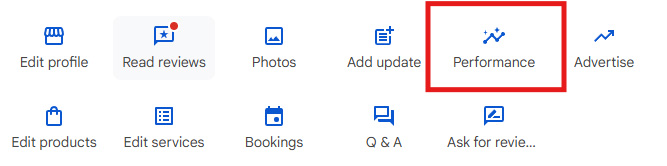
You must track, monitor, and measure performance using actionable data to ensure your local SEO strategy works. These local SEO KPIs help you gauge visibility and conversions on your Google Business Profile (GBP) and website.
Key Metrics to Monitor
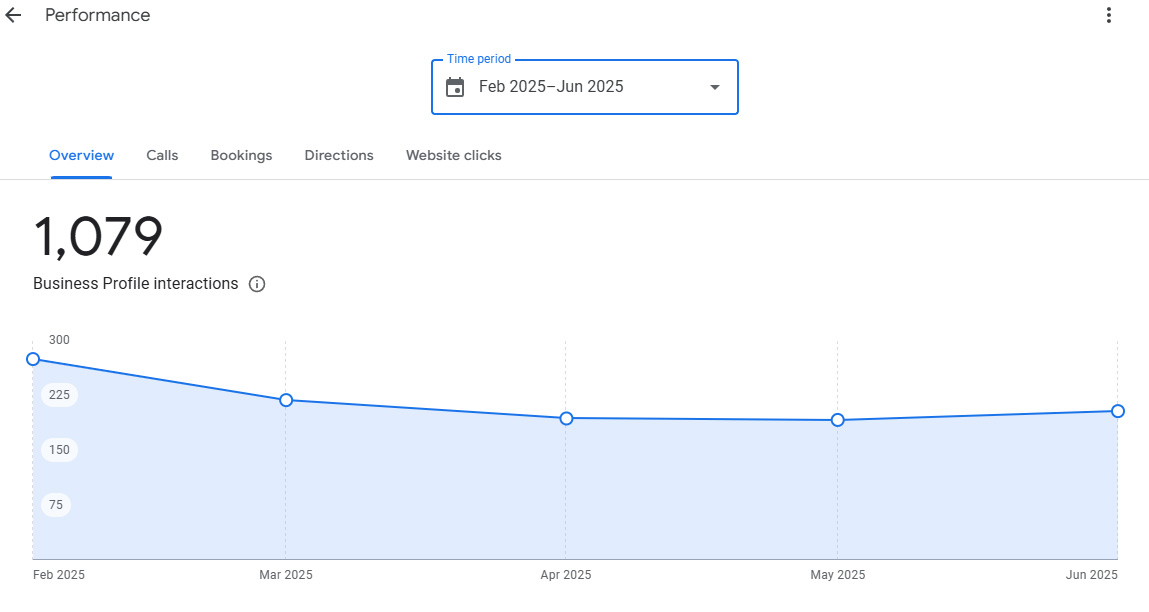
GBP Views (Search & Maps)
- Tracks how often your listing appears on Google Search and Maps.
- Check the split between Direct, Discovery, and Branded searches in GBP Insights.
Direction Requests
- Shows high purchase intent.
- Identify customer clusters by zip code or city to refine service targeting.
Call Clicks (from GBP)
- Measures how many users tap the “Call” button.
- Use UTM (Urchin Tracking Module) or call tracking tools for deeper attribution.
Organic Traffic by Location
- Monitor in Google Search Console (GSC) by filtering queries/pages by city.
- Focus on high-intent, geo-modified keywords and landing page traffic.
Keyword Rankings (Local Pack + Organic)
- Track keyword positions in both the Google Map Pack and standard search results.
- Use tools like BrightLocal or Whitespark for city-level or zip code accuracy.
CTR & Bounce Rate by City Pages
- Use GA4 to analyse user engagement on city/service landing pages.
- A high bounce rate can indicate poor content match or slow mobile UX.
Tips for Competitive Local Markets
Some of the pro-level tactics to help your business dominate local SEO:
- Use Geo-Fencing & Local Services Ads (LSAs): Geo-fencing enables you to target users within a defined physical radius, showing ads only to those most likely to convert nearby.
Combine this with Google’s Local Services Ads, which appear above the map pack and offer pay-per-lead visibility-a game-changer for service providers in high-competition niches.
- Integrate Google Business Profile (GBP) with PPC: Dominate organic and paid local real estate by running branded and local service Google Ads alongside your GBP. Use call extensions and location targeting to increase click-through rates and conversions, especially from mobile users searching for immediate service.
- Stay Compliant with Review Generation (No Gating): While positive reviews are critical, avoid review gating, filtering customers before asking for a review, as it violates Google’s policies.
Instead, tools like GatherUp or Grade.us can automate follow-ups and ethically capture feedback. Always incentivize honestly, without requiring a review in exchange.
- Build E-E-A-T for Local Authority: Strengthen your business’s Experience, Expertize, Authoritativeness, and Trustworthiness by showcasing certifications, case studies, professional bios, and client success stories.
Respond to reviews, ensure your GBP and website are aligned, and build mentions in local media to increase Google’s trust.

Create Hyper-Local Topical Clusters: Develop blog posts and service pages that target specific neighborhoods, landmarks, or micro-markets in your city.
For example, a pest control service in Chennai might publish content like “Cockroach Control Tips for T. Nagar Apartments.” Link these to your city landing page to boost topical authority and relevance.
Read Also: How To Optimize Google Business Profile
Summary
What Is Local SEO?
Local SEO helps improve your visibility in local search results by optimizing your online presence, especially your Google Business Profile.
Factors To Consider in Local SEO
- NAP consistency (name, address, phone number)
- Google business profile optimisation
- High-quality local reviews
- Localized on-page SEO
- Structured data (local business schema)
- Location-specific content strategy
Traditional SEO vs. Local SEO: Key Differences
Traditional SEO aims for national or global visibility, focusing on content, backlinks, and website performance. Local SEO targets nearby customers with high-intent, location-based searches using tools like Google Business Profile.
Three Local Ranking Pillars
- Proximity
- Relevance
- Prominence
Local Keyword Research & On-Page SEO
- Understand Local Intent
- Target Keyword Variations
- Use the Right Tools
- Internal Linking Matters
- Optimize URL Structure
Google Business Profile Optimisation (Core of Local SEO)
- Claim and verify your listing
- Use an accurate business name (no keyword stuffing)
- Select the most relevant primary & secondary categories
- Write an optimized business description (with localized keywords)
- Optimize the products and services section
- Upload geo-tagged photos and videos
- Post weekly on Google (events, offers, updates)
- Monitor and seed the Q&A section
- Keep attributes and business hours accurate
- Complete your profile 100%
Website Optimisation for Local SEO
- Homepage must reflect core local signals
- Embed Google Maps on the contact page
- Create location-specific service pages
- Build city or neighborhood pages (ethically)
- Ensure a mobile-first, fast-loading design
- Implement local business schema markup
Mobile Optimisation & Core Web Vitals
Google ranks your site based on mobile performance, so you risk losing rankings and customers if it’s not mobile-friendly and fast.
Key Metrics to Monitor for Local SEO
- GBP views (search & maps)
- Direction requests
- Call clicks (from GBP)
- Organic traffic by location
- Keyword rankings (local pack + organic)
- CTR & bounce rate by city pages
Tips for Competitive Local Markets
- Use geo-fencing & local services ads (LSAs)
- Integrate google business profile (GBP) with ppc
- Stay compliant with review generation (no gating)
- Build E-E-A-T for the local authority
- Create hyper-local topical clusters
FAQs
How long does local SEO take to show results?
Local SEO usually takes 3 to 6 months to deliver noticeable results, depending on factors like competition level, geographic area, and how well your profile and website are optimised. However, some improvements, like GBP updates or citation corrections, can impact visibility within weeks.
How do I choose the right primary and secondary categories in GBP?
Choose a primary category that best represents your main service, then add secondary categories that reflect additional services you offer, and ensure all are relevant and accurate.
What influences your visibility most in local SEO?
Google’s top 3 local SEO ranking factors are:
- Proximity (distance from searcher),
- Relevance (how well your business matches the search),
- Prominence (your reputation, reviews, and overall authority online).
Does embedding Google Maps on my website help with local SEO?
Yes, embedding a Google Map with your exact business location on your contact or location page improves usability and reinforces local relevance.
It also helps Google better connect your website with your Business Profile, improving its understanding of your location and relevance in local searches.
How often should I post to Google Business Profile?
Post to your Google Business Profile at least once a week to stay active and boost visibility in local search.
What are citations in local SEO?
Citations in Local SEO are online mentions of your business name, address, and phone number (NAP) on directories, websites, and apps, helping improve local search visibility and credibility.
Do reviews help with local SEO?
Yes, high-quality, recent reviews improve trust, engagement, and visibility in Google’s local results. Review quantity, quality, and response rate are all considered in the local SEO algorithm.
Should I create separate pages for each location I serve?
Yes, creating separate pages for each location helps target local keywords, improves SEO, and provides a better user experience for location-specific searches.
What tools should I use to track local SEO performance?
To track local SEO performance, use a combination of:
- Google Business Profile Insights
- Google Search Console
- Google Analytics (GA4)
Can I rank in multiple cities without physical locations?
Yes, you can rank in multiple cities without physical locations by creating location-specific landing pages with unique, valuable content, but results may be limited compared to businesses with verified addresses.